

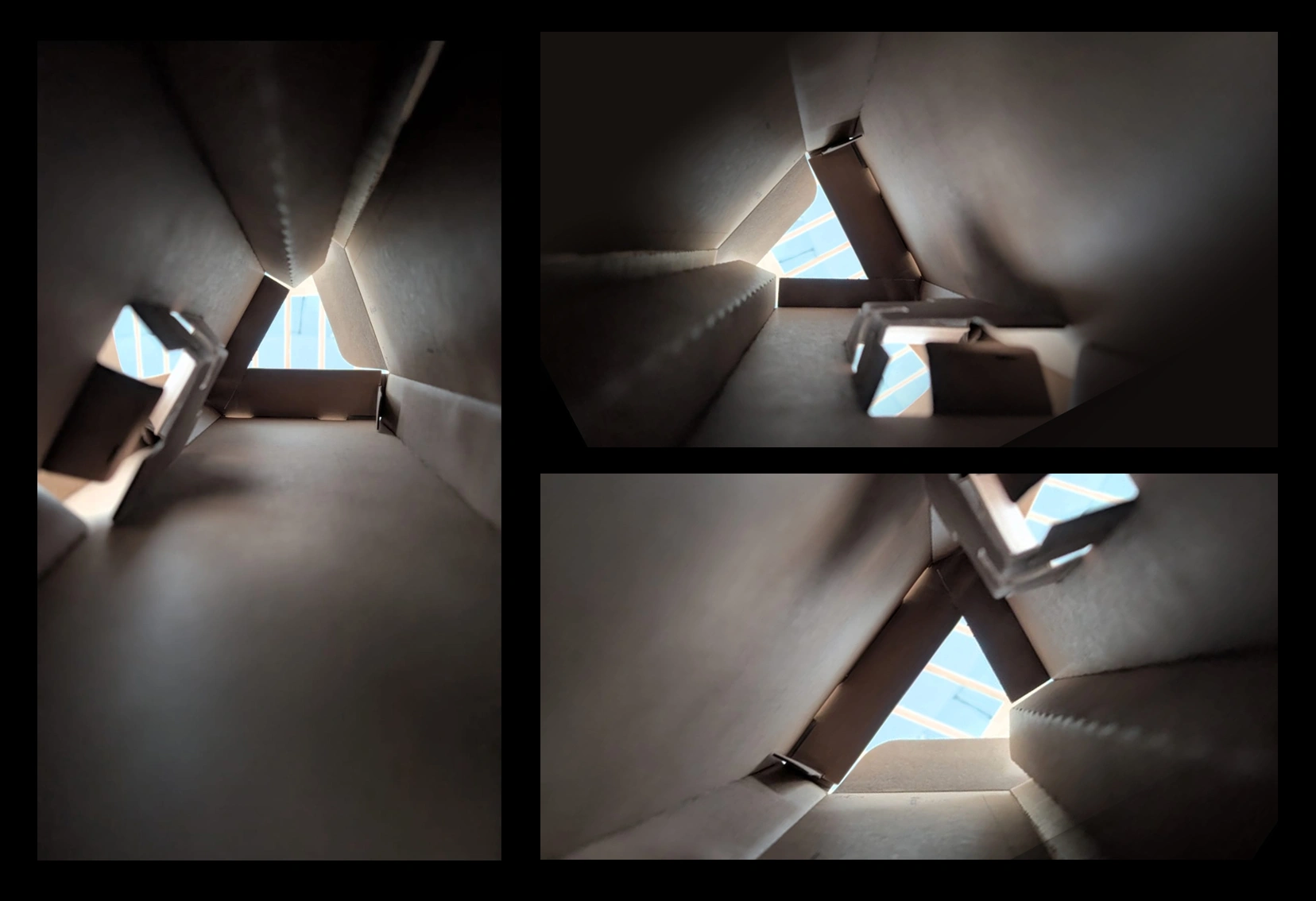
Here are two additional tips:
- point any opening towards a light source so you’ll photo have a back lighting… it’ll be more ‘moody’ and suggestive ;)
- don’t discard a photo at first glance… you can flip it, rotate it and crop it in different wats to create multiple variations.
Once you have your reference and inspiration, get to work… we used Blender to extrude the edges of a simple plane to setup the room. Then added a single light source and that’s it (the render is on the left).

A simple cool trick you can use is to add a ‘Solidify’ modifier and a ‘Bevel’ modifier to the mesh so you get thickness and softer edges.. this will make it look instantly much better!

Then you can just use a quick automatic UV unwrap like ‘smart UV project’ form the UV menu and then apply an interesting texture… We're using the exact same texture everywhere.
We also added a photo of a city into a plane and added some emissive to reenforce the backlighting idea:

Finally, to get the whole sci-fi vibe, we tweaked the lighting a bit, added some assets and a box that cover the entire ‘room’ and applied a volume scatter to produce that nice atmospheric moody render.

That’s it! This is a very fun technique to try so give it a go and see what you get. Make sure you tag Pablo M. @pablander and @pablander.academy so we can see it!


.jpg)

.jpg)
.jpg)
.webp)